Before the Noticeboard Went Digital
Before the noticeboard went digital, shared information depended on placement, upkeep, and reader attention. See how that routine still guides public notices.
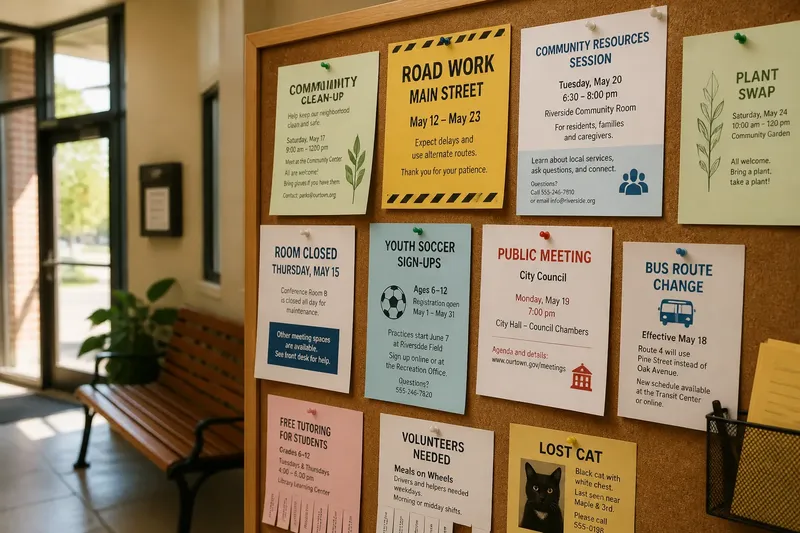
Before the noticeboard went digital, a public notice had to earn attention in a physical place: someone chose what to post, someone else decided where it belonged, and readers encountered it while passing by. That routine offers a useful way to think about screens today. A digital board can change the surface, but it still needs a clear purpose, a responsible editor, and a regular rhythm of updates.
Think of the board as a shared table rather than a broadcast channel. People approach it for different reasons and at different times; they need to tell quickly what applies to them and what to do next. The week-long routine below treats a noticeboard as civic infrastructure, whether its messages are pinned to cork or displayed on a screen.
Monday is for deciding what belongs on the board
Start the week by gathering proposed notices in one place. A shared inbox, a paper tray, or a simple document can serve as the intake point. Ask each contributor for the same essentials: a short title, the intended audience, the action or information, the responsible contact, and the date when the notice should stop appearing.
Then sort by reader need, not by who submitted the item. A service interruption, a public meeting, a recurring class, and a general invitation may all matter, but they do not ask the same thing of readers. Mark whether each message is time-sensitive, tied to a particular location, or useful over a longer period. Those distinctions will shape its placement and display time.
Set a simple inclusion rule and apply it consistently. A public board should not become a private advertising wall or a collection of messages that only insiders understand. For each submission, ask whether it serves a shared purpose, whether the intended reader can be identified, and whether the message gives enough context to act. If information is missing, return the draft with a specific request rather than silently rewriting its meaning.
Tuesday is for editing the message around the reader
On Tuesday, revise accepted notices so readers can grasp the point without decoding office language. Put the main event or change first, name the relevant place in familiar terms, and make any required action explicit. Replace vague phrases such as “appropriate parties should make arrangements” with a direct instruction that identifies who needs to do what.
Keep the title distinct from the body. “Room closed Thursday” gives a passerby a quick reason to read on; a department name alone does not. In the body, explain what is affected, what remains available, and where to get help if the notice leaves an important question open. If there is no action for the reader, say what the information means rather than manufacturing a call to action.
Imagine a community group submits a paper announcement that says, “Community resources session, details to follow.” The editor asks for the time, venue, intended audience, and a contact method before approving it. The group supplies those details; the revised notice gives readers enough information to decide whether to attend and how to ask a question. The board has not changed the event—it has made the invitation usable.
Wednesday is for choosing a place and a duration
A paper noticeboard makes location visible: a message near a transit entrance reaches a different audience from one beside a service counter. Digital displays also have locations, even when a network can send the same item to several screens. Decide which readers are likely to encounter the information, then select the locations that match. Do not assume that a message posted in one place has reached everyone who might need it.
Give each notice a display period that fits its purpose. A one-time closure should disappear after the change has passed; a recurring program may remain while enrollment is open. Put an end date on the working copy even if the public display does not show it. Without an expiry point, old notices tend to survive because nobody has a clear reason to remove them.
For a physical board, consider how layers, paper size, and nearby signs affect visibility. For a screen, consider how quickly a reader can catch the message during a short pass. In both cases, the first lines should carry the essential information. A reader should not have to wait for a loop to restart or move a stack of papers to discover whether the notice concerns them.
Thursday is for checking access and ownership
Review each notice from the perspective of someone unfamiliar with the organization’s internal terms. Expand abbreviations that are not widely understood, identify a place by a recognizable name, and avoid relying on color alone to communicate meaning. On a screen, text contrast and readable type matter; on paper, placement and legibility matter. The format changes, but the reader still needs a message they can perceive and understand.
Confirm that each notice has an owner: a person or team who can answer questions and confirm changes. A contact should be useful, not ornamental. If readers are directed to a desk, mailbox, phone line, or web page, make sure that route is current and appropriate for the question. Where a display is meant to serve people who do not use the associated website, include enough information on the notice itself to make the next action clear.
For notices involving access, eligibility, public services, or local requirements, keep wording aligned with the responsible organization’s current instructions. The board editor can improve clarity without changing a policy or promise. If the meaning is uncertain, ask the responsible staff member to confirm it before publication.
Friday is for publishing, removing, and learning
Before the weekly update, compare the approved list with what is actually on display. Remove expired items, replace superseded versions, and check that locations have not been missed. For paper, look for curled corners, overlapping sheets, and notices hidden behind newer ones. For screens, check that the right message appears on the intended display and that its text remains readable at a glance.
Keep a small record of what changed: notices added, removed, corrected, or held for clarification. This is not paperwork for its own sake. It helps the next editor see whether an item is new, whether a correction has already been made, and who should be asked about an unresolved detail. A basic log also makes responsibility visible when several people share upkeep.
Ask one practical question after publication: what did readers still need to ask? Repeated questions may point to a missing detail, an unclear location, or a contact route that is hard to find. Treat the questions as a prompt to revise the notice, not as evidence that readers failed to pay attention. A shared board works best when its editors take responsibility for making the message easier to use.
What changes when a noticeboard moves online?
Does a digital board need the same editorial routine?
Yes. A screen still needs someone to review submissions, confirm details, choose placement, and remove outdated information. Automation can move a notice between displays, but it cannot decide whether the message is clear or still relevant.
How should a notice be written for a display people pass quickly?
Lead with the event, change, or action, then add the details needed to understand it. Keep the first lines useful on their own, and provide a clear route for readers who need more information.
What should happen to notices that remain useful for a long time?
Give them a review date and a named owner, even if their content is not tied to a single event. The owner can confirm that the information remains current before the notice continues to appear.
Can paper and screen notices share one process?
They can share intake, editing, ownership, and expiry rules. Their display checks differ: paper calls for attention to placement and overlapping sheets, while a screen calls for checks on legibility and correct playback.
Keep the routine steady as the surface changes
A noticeboard’s value comes from the relationship between message, place, and upkeep. Paper made the editor’s choices visible in pins, layers, and empty spaces; a screen can make those choices less obvious, but they still shape what a reader sees. A dependable weekly routine keeps the board from becoming a backlog of announcements and gives each message a clear moment of attention.
Use “before the noticeboard went digital” as a reminder to preserve that editorial care, not as a reason to prefer one medium. The useful question is whether a reader can recognize the notice, understand why it matters, and find the next step without guessing. When the answer is yes, the board is doing its civic work—one well-kept message at a time.